Syntax Flexibility
In this chapter we will learn about some options that are provided automatically by the Ring compiler for syntax flexibility.
Change Language Keywords
We can change any keyword using the ChangeRingKeyword command.
Note
Remember to restore the keyword again if the team will mix between styles in the same project.
Tip
The ChangeRingKeyword command is executed in the scanner stage by the compiler (before parsing).
Syntax:
ChangeRingKeyword <oldkeyword> <newkeyword>
Example:
ChangeRingKeyword see print

print "welcome" + nl

ChangeRingKeyword print see

see "Welcome" + nl
Example:
ChangeRingKeyword  func function
ChangeRingKeyword  see  print
ChangeRingKeyword  ok   endif
ChangeRingKeyword  next endfor
ChangeRingKeyword  end  endwhile

x = 10
while x > 0
        print "x = " + x + nl
        for t = 1 to 10
                if t = 3
                        print "number three" + nl
                endif
        endfor

x--
endwhile

test()

function test
        print "message from test" + nl

ChangeRingKeyword  function func
ChangeRingKeyword  print see
ChangeRingKeyword  endif ok
ChangeRingKeyword  endfor next
ChangeRingKeyword  endwhile end
Change Language Operators
We can change any operator using the ChangeRingOperator command.
Note
Remember to restore the operator again if the team will mix between styles in the same project.
Tip
The ChangeRingOperartor command is executed in the scanner stage by the compiler (before parsing).
Syntax:
ChangeRingOperator <oldkeyword> <newkeyword>
Example:
The next program hide the + operator by changing it to _+
changeringoperator + _+
changeringkeyword SEE PRINT

try
        print 5 + 10
catch
        print nl print "error" print nl
done

changeringoperator _+ +
The next program change the + operator to “plus”.
changeringoperator + plus
changeringkeyword SEE PRINT

Print 5 plus 5

changeringoperator plus +
changeringkeyword PRINT SEE
Load Syntax Files
You may store a group of ChangeRingKeyword and ChangeRingOperator commands in a file to use later in many source files. You can’t use the Load command to call these files because
ChangeRingKeyword and ChangeRingOperator commands are executed in the scanner phase by the compiler (before parsing).
The load command is executed in the parsing phase (after the scanner phase).
Solution: Use the LoadSyntax Command which is executed in the scanner phase.
Syntax:
LoadSyntax "syntaxfile.ring"
Example:
File : StyleBasicOn.ring
ChangeRingKeyword       see     print
ChangeRingKeyword       ok      endif
ChangeRingKeyword       next    endfor
ChangeRingKeyword       end     endwhile
File : StyleBasicOff.ring
ChangeRingKeyword  print        see
ChangeRingKeyword  endif        ok
ChangeRingKeyword  endfor       next
ChangeRingKeyword  endwhile     end
File : UseStyleBasic.ring
LoadSyntax "stylebasicon.ring"

x = 10
while x > 0
        print "x = " + x + nl
        for t = 1 to 10
                if t = 3
                        print "number three" + nl
                endif
        endfor
        x--
endwhile

LoadSyntax "stylebasicoff.ring"

see "done" + nl
Note
files called by the LoadSyntax command must contains ChangeRingKeyword and ChangeRingOperator commands only.
Tip
files called by the LoadSyntax command doesn’t support functions, packages and classes. just imperative commands only.
Note
Using this feature you can create many styles that you can use in the same project and you can support Ring translation to other languages like Arabic, French and so on.
Tip
The effect of LoadSyntax command is related to the current source code file only.
Tip
Using LoadSyntax command is optional, See the (Automatic loading for syntax files) section.
Using Keywords as Identifiers
The next keywords could be used as variables/attributes/etc.
This is useful when creating domain-specific languages that uses these keywords in the commands.
Again
But
Case
Catch
Done
Else
From
In
Off
Ok
On
Other
Step
To
Example:
new Love {
        I will say it Again and Again
        YOU ARE MY LOVE
        Come with me To the Sky
}

class Love

        To Again

        func getTo
                ? "Where?"

        func getAgain
                ? "Really?"
                return True

        func braceError
Output:
Really?
Really?
Where?
Translating Internal Identifiers
Ring now supports the translation of internal identifiers using the ChangeRingKeyword command. This allows translation without breaking existing code that relies on English identifiers.
The identifiers that can be translated are:
This
Self
Super
Main
Init
Operator
BraceStart
BraceExprEval
BraceNewLine
BraceError
BraceEnd
RingVM_See
RingVM_Give
RingVM_ErrorHandler
Note
Ring defines keywords that act as wrappers for these identifiers (i.e., when the Ring Parser encounters such a keyword, it is converted into the corresponding identifier).
Example:
new point { x=10 y=20 z=30 ? self }

ChangeRingKeyword self my

new point { x=10 y=20 z=30 ? my }

# Since self is an identifier (not a real keyword)
# We can use (self) or (my) at the same time

new point { x=100 y=200 z=300 ? my ? self }

new point { x=1000 y=2000 z=3000 test()}

class parent

        func test

                ? "Parent - Test()"

class point from parent x y z

        func test

                ChangeRingKeyword this mypoint

                ? this
                ? mypoint

                ChangeRingKeyword super father

                super.test()

                father.test()
Output:
x: 10
y: 20
z: 30

x: 10
y: 20
z: 30

x: 100
y: 200
z: 300

x: 100
y: 200
z: 300

x: 1000
y: 2000
z: 3000

x: 1000
y: 2000
z: 3000

Parent - Test()
Parent - Test()
Using Parentheses around the function parameters
We can use Parentheses around the function parameters (optional).
Example:
hello()
sum(3,4)

func hello()
        see "Hello" + nl

func sum(x,y)
        see x+y+nl
Output:
Hello
7
Example:
myfunc = func x,y { see x + y + nl }

call myfunc (3,4)

myfunc2 = func (x,y) { see x+y+nl }

call myfunc(3,4)
Output:
7
7
Using Semi-colon after and between statements
In Ring we can use semi-colon after and between statements (optional).
Example:
# Using semi-colon is optional

see "Hello" + nl ; see "How are you?" + nl  ; see "Welcome to Ring" + nl ;
one() ; two() ; three() ;
func one ; see "one" + nl ;
func two ; see "two" + nl ;
func three ; see "three" + nl ;
Output:
Hello
How are you?
Welcome to Ring
one
two
three
Flexible Statement Separation
The language support using commas (,) as an alternative to semicolons (;) when separating statements.
Importantly, semicolons themselves are optional, so you can write code in three different styles
Example (1):
x=1, y=2, z=3
? x, ? y, ? z

x=10; y=20; z=30
? x; ? y; ? z

x=100 y=200 z=300
? x ? y ? z
Output:
1
2
3
10
20
30
100
200
300
Example (2):
new xBaseUserInterface {
        @10, 10 say "Hello, World!"
        @11, 10 say "I Love Programming!"
}

class xBaseUserInterface

        func braceError
                ? getVarName(cCatchError)

        func getVarName cError
                if left(cError,11) = "Error (R24)"
                        return substr(cError,45)
                ok

        func braceExprEval vValue
                if vValue ? vValue ok
Output:
@10
10
say
Hello, World!
@11
10
say
I Love Programming!
Using $ and @ in the start of the variable name
You can use any unicode character in the variable name also we can use $ and @ in the name.
This feature may help, for example we can start global variables with $ and the object attributes with @.
In other languages like Ruby this is the rule, In the Ring language this is just an option without any force from the Compiler.
example:
$global_variable = 5

new test { hello() }

class test

        @instance_variable = 10

        func hello

                local_variable = 15

                see "Global   : " + $global_variable + nl +
                    "Instance : " + @instance_variable + nl +
                    "Local    : " + local_variable + nl
Output:
Global   : 5
Instance : 10
Local    : 15
Using the ‘elseif’ keyword as ‘but’ in if statement
if you don’t like the ‘but’ keyword in if statement Then you can use the ‘elseif’ keyword.
Example:
give x
if x = 1 see "one"
elseif x=2 see "two"
elseif x=3 see "three"
elseif x=4 see "four"
else see "other"
ok
see nl
Using the ‘else’ keyword as ‘other’ in switch statement
if you don’t like the ‘other’ keyword in switch statement Then you can use the ‘else’ keyword.
Also you can replace ‘else’ with ‘other’ in if statement.
i.e. ‘other’ keyword is the same as ‘else’ keyword.
Example:
x = 1
switch x
        on 10
                see "10" + nl
        else
                see "not 10" + nl
end
Output:
not 10
Using the ‘end’ keyword in different control structures
We can use the ‘end’ keyword to close different control structures
If statement
For loop
Switch
While
Try-Catch
Example:
see "if statement.." + nl
x = 1
if x = 1
        see "one" + nl
elseif x=2
        see "two" + nl
elseif x=3
        see "three" + nl
end
see "for loop.." + nl
for t = 1 to 10
        see t
end
see nl
see "switch..." + nl
x = 1

switch x
        on 1 see "one" + nl
        on 2 see "two" + nl
end

see "try catch..." + nl
try
        x = 1 / 0
catch
        see "catching error" + nl
end
Output:
if statement..
one
for loop..
12345678910
switch...
one
try catch...
catching error
Using braces to start and end different control structures
We can use braces { } to start and end different control structures
If statement
For loop
Switch
While
Try-Catch
Example:
see "if statement.." + nl
x = 1
if x = 1 {
        see "one" + nl
elseif x=2
        see "two" + nl
elseif x=3
        see "three" + nl
}
see "for loop.." + nl
for t = 1 to 10 {
        see t
}
see nl
see "switch..." + nl
x = 1

switch x {
        on 1 see "one" + nl
        on 2 see "two" + nl
}

see "try catch..." + nl
try {
        x = 1 / 0
catch
        see "catching error" + nl
}
Output:
if statement..
one
for loop..
12345678910
switch...
one
try catch...
catching error
Using ‘put’ and ‘get’ as ‘see’ and ‘give’
We can replace the ‘see’ keyword with the ‘put’ keyword.
Also we can replace the ‘give’ keyword with the ‘get’ keyword.
Example:
put "Hello World" + nl
put "Enter Your Name ? " Get Name
Put "Hello " + Name
Using ‘case’ as ‘on’ in switch statements
We can replace the ‘on’ keyword with ‘case’ keyword in the switch statement.
Example (1) :
for x=1 to 10
        switch x
        case 1 put "one" + nl
        case 2 put "two" + nl
        case 3 put "three" + nl
        else put "else" + nl
        end
end
Example (2) :
for x=1 to 10 {
        switch x {
        case 1 put "one" + nl
        case 2 put "two" + nl
        case 3 put "three" + nl
        else put "else" + nl
        }
}
Using ‘def’ as ‘func’ in functions/methods definition
We can use the ‘def’ keyword as the ‘func’ keyword to define functions and methods.
Example:
one() two()

def one put "one" + nl
def two put "two" + nl
Using braces { } in Packages/Classes/Functions
Example:
load "stdlib.ring"

import mypackage

new myclass {
        myfunc()
}

package mypackage
{
        class myclass
        {
                func myfunc
                {
                        print("Hello, World!\n")
                }
        }
}
Using ‘break’/’continue’ keywords
Instead of using Exit/Loop commands we can use Break/Continue
Example:
for t=1 to 10 {
        if t=3 {
                continue
        elseif t=5
                break
        }
        ? t
}
Output:
1
2
4
Using ‘end’ keyword after Packages/Classes/Functions
Example:
import mypackage

new myclass {
        myfunc()
}

package mypackage
        class myclass
                def myfunc
                        put "Hello, World!"
                end
        end
end
Using ‘function’/’endfunction’ keywords
Example:
one() two() three()
function one
        ? :one
endfunction
function two
        ? :two
endfunction
function three
        ? :three
endfunction
Using ‘endif’/’endfor’/’endwhile’/’endswitch’/’endtry’ keywords
Example:
for t=1 to 10
        if t=3
                ? :three
        endif
endfor
Using ‘endpackage’/’endclass’/’endfunc’ keywords after Packages/Classes/Functions
Example:
import mypackage

new myclass { myfunc() }

package mypackage
        class myclass
                func myfunc
                        see "welcome"  + nl
                endfunc
        endclass
endpackage
Ignore new lines after keywords
Starting from Ring 1.8 the compiler will ignore new lines after keywords that expect tokens after it
Example:
see
"
        Hello, World!
"
test()

func
#======================#
        Test
#======================#

        ?
        "

        Hello from the Test function

        "
Output:
Hello, World!


Hello from the Test function
Automatic loading for syntax files
Starting from Ring 1.18 we have better syntax flexibility
Support running source code files with any extension
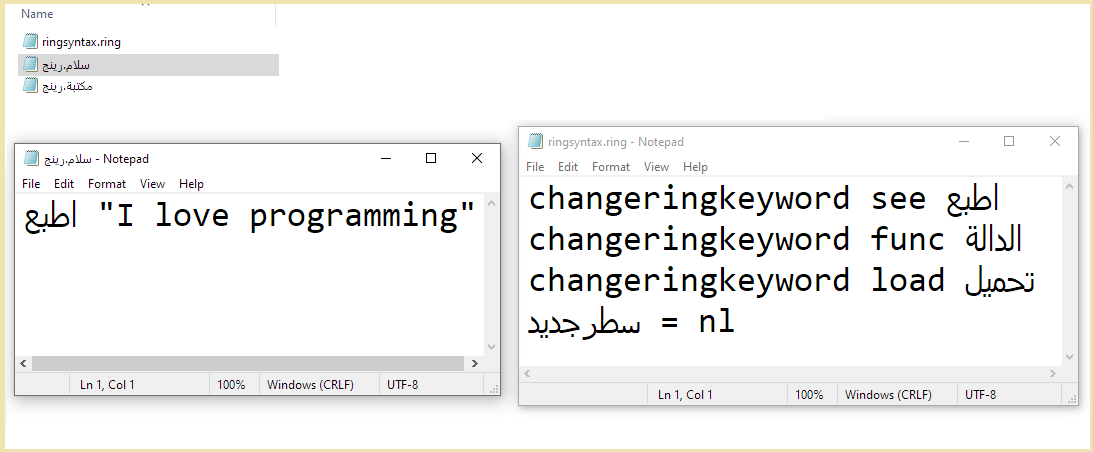
Automatic loading for (ringsyntax.ring) file that exist in the current folder
For example in the the next screen shot
We have (ringsyntax.ring) that translate some of the Ring keywords to Arabic language
When we execute the file with Arabic name which means in English (hello.ring)
Ring will automatically execute (ringsyntax.ring) using Load Syntax command
Each Folder in the program could have it’s optional (ringsyntax.ring) file
We can mix styles in the same project
For Windows users, To use Arabic source code files with Ring, Set the language settings.

Enable/Disable Hash Comments
Starting from Ring 1.20 we have the next two commands supported by the Ring Scanner
EnableHashComments
DisableHashComments
Example:
DisableHashComments
#define = 10
EnableHashComments
# Just a comment
DisableHashComments
? #define
EnableHashComments
# End of program