What is new in Ring 1.25
In this chapter we will learn about the changes and new features in Ring 1.25 release.
List of changes and new features
Ring 1.25 comes with the next features!
Stock Analysis Application
DistroMap API
RingVaders Game
Im2ANSI Tool
MyCTiger Tool
More Samples
More RingPM Packages
Better NaturalLib
Better TokensLib
Better RingLibCurl
Callable Functions as Methods
Flexible Statement Separation
Using Keywords as Identifiers
Newline Callbacks Inside Braces
Translating Internal Identifiers
RingVM_TranslateCFunction() function
RingVM_ErrorHandler() function
RingVM_RingoLists() function
RingVM_WriteRingo() function
Ring Object File Format Update
More Improvements
Stock Analysis Application
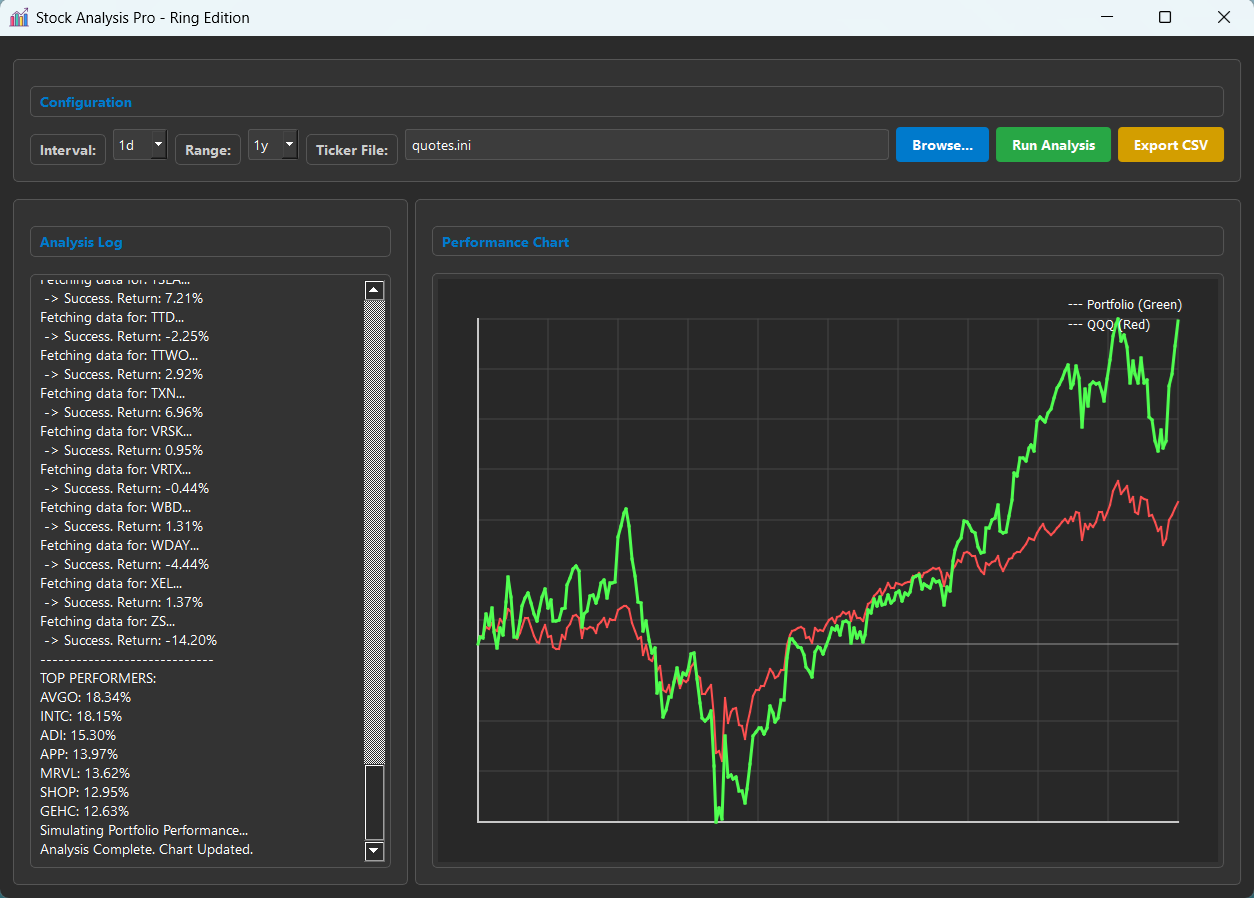
Stock analysis and simulation tool that fetches historical price data from Yahoo Finance, parses it into usable time series, calculates momentum-based returns, and simulates portfolio performance against a benchmark (QQQ).
The application is developed using Ring, RingQt, RingLibCurl & RingJSONLib
Install:
ringpm install stockanalysis
DistroMap API
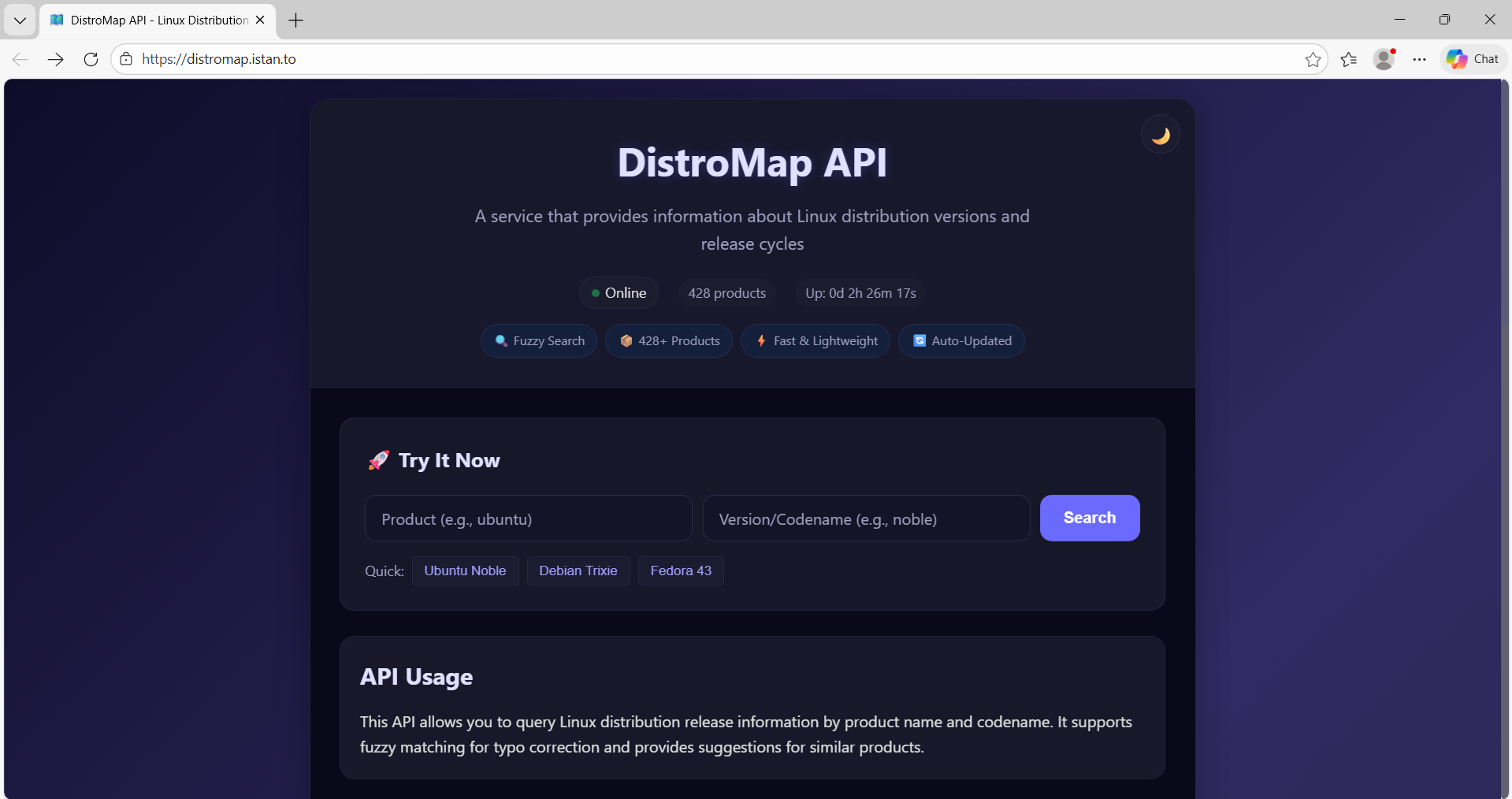
A lightweight web API server built with Ring that provides Linux distribution and release information based on codenames.
Install:
ringpm install distromap
RingVaders Game
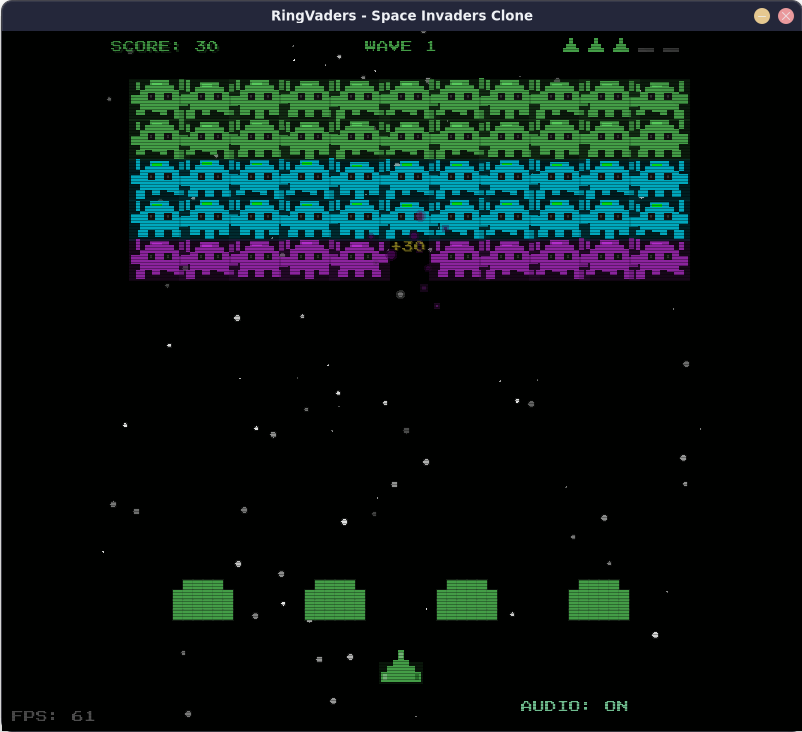
A retro arcade shooter game written in Ring using RingAllegro.
A clone of the classic Space Invaders.
Install:
ringpm install ringvaders
Im2ANSI Tool
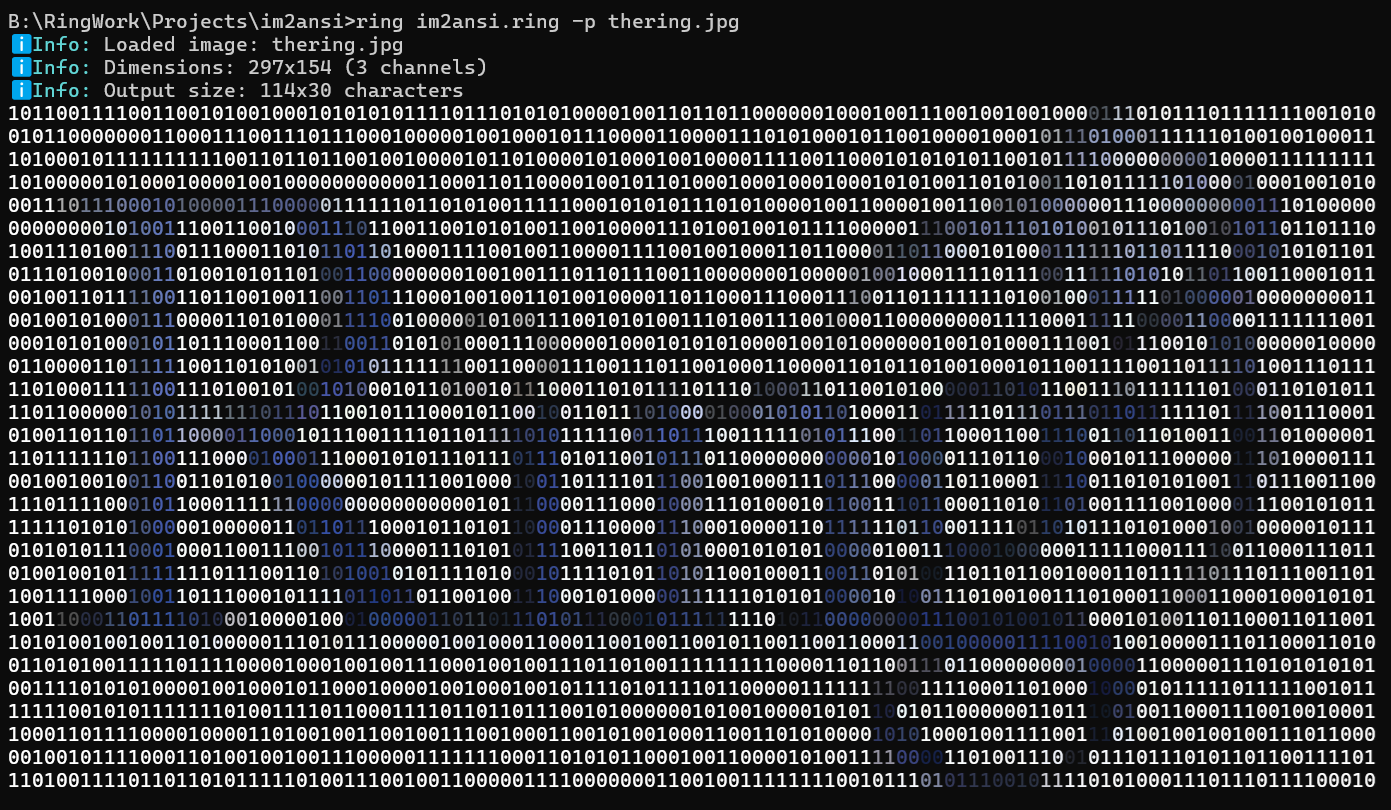
Convert images into beautiful ANSI/ASCII art
Developed using Ring, RingStbImage and RingFastPro
Install:
ringpm install im2ansi
Features:
Multiple Formats (Export to ANSI, ASCII, SVG, or HTML)
Flexible Sizing (Control width and/or height independently)
Color Inversion (Invert brightness for different backgrounds)
Custom Characters (Use your own character sets for unique art)
ASCII Ramps (12 built-in grayscale character ramps)
Reproducible Output (Set a seed for consistent results)
Cross-Platform (Works on Linux, macOS, and Windows)
MyCTiger Tool
Use the Ring programming language for generating and building C programs.
URL: https://github.com/ringpackages/myctiger
Usage:
Tiger <filename.tiger>
Output:
<filename.c>            // Generated C source code
<filename.exe>          // Executable file
Example:
Tiger {

        "Hello, World! \n"

        #=================================================
        C `
                for (int x=1 ; x <= 5 ;x++) {
                        printf("%d\n",x);
                }
        `
        #=================================================

        if isWindows()
                "I am using Windows\n"
        else
                "I am not using Windows\n"
        ok

}
To build and run the program
Tiger test.tiger
Output:
Hello, World!
1
2
3
4
5
I am using Windows
Generated C code (test.c)
#include "stdio.h"
int main(int argc, char *argv[])
{
        printf("Hello, World! \n");
        for (int x=1 ; x <= 5 ;x++) {
                printf("%d\n",x);
        }
        printf("I am using Windows\n");
        return 0;
}
Tip
Imagine using MyCTiger and NaturalLib to build a domain‑specific language for microcontroller programming — giving you the flexibility of the Ring language and the performance and efficiency of C at the same time.
More Samples
The next samples are added:
samples/UsingQt/DateEdit/daysto.ring
samples/UsingQt/Combobox/ComboboxAlignItems.ring
samples/UsingQt/LocalFont/test.ring
samples/UsingTokensLib/test2.ring
samples/UsingJSONLib (test14.ring and test15.ring)
samples/UsingNaturalLib/tests/largecode.ring
samples/UsingNaturalLib/advanced (concepts.ring, from lang1.ring to lang31.ring)
samples/General/ListFunctions/ListFunctions.ring
samples/General/Orbital/Obital-Solar-Eclipse.ring
samples/General/Orbital/Obital-Lunar-Full-Moon-Meesus.ring
samples/General/Orbital/Length-Of-Day-Calculator.ring
More RingPM Packages
The following packages have been added to the RingPM registry.
Argon2: Ring binding for Argon2 hashing algorithm
Bcrypt: Ring binding for the bcrypt password hashing algorithm
FTP: A comprehensive FTP client library
Ring-LibSQL: LibSQL client extension for the Ring language
UUID: Extension for Universally Unique Identifier generation and validation
Ring2EXE-Plus: Modern Packaging Options and Enhanced Compiler Control
Ring-HTML: HTML5 parser library with CSS selectors and DOM manipulation
RingML: Building Neural Networks (Using RingFastPro)
RingTensor: Extension designed specifically to accelerate Matrix operations
RingML-using-RingTensor: Building Neural Networks (Using RingTensor)
Stock-Analysis-BM: Stock Analysis Momentum using Mega Stocks ticker list
RingQML: A library used to interact with QML (Qt Meta-object Language)
PrayTimes: Prayer times application developed using Ring and RingQML
Better NaturalLib
The NaturalLib is updated to provide
Better Performance
The next methods are added to the NaturalLanguage class
loadCommand(cCommandName)
execute(cCode)
setBeforeRun(cCode)
setAfterRun(cCode)
setStartKeywordsWith(cStart)
setMaskKeywords(lMask)
setMaskOperators(lMask)
getBeforeRun() –> cCode
getAfterRun() –> cCode
getStartKeywordsWith() –> cStart
getMaskKeywords() –> lMask
getMaskOperators() –> lMask
The next methods are added to the NaturalCommand class
setPackageName(cName)
startCache(cName)
endCache()
We can use the following methods to access the command parameters, set the command output, and control NaturalLib’s behavior.
expr(nPara) –> Value
isIdentifier(nPara) –> lStatus
commandReturn(vValue)
passThisCommand()
register(cAttribute)
callerGetVar(cVar)
callerSetVar(cVar,vValue)
Example:
load "stdlibcore.ring"
load "naturallib.ring"

defineNaturalCommand {
        setPackageName("RingLang.NaturalLib")
        startCache(:MyDSL)
        syntaxIsCommand([
                :Command = "I want window",
                :Function = func {
                        ?  "Command: I want window"
                        callerSetVar(:Secret,"Ring Programming is Fun!")
                }
        ])
        syntaxIsCommand([
                :Command = "I want button",
                :Function = func {
                        ?  "Command: I want button"
                }
        ])
        syntaxIsCommandExpression([
                :Command = "Window title is",
                :Function = func {
                        ?  "Command: Window title is " + Expr(1)
                }
        ])
        endCache()
}

new NaturalLanguage {
        setPackageName("RingLang.NaturalLib")
        setLanguage(:GUI)
        loadCommand(:MyDSL)
}

func main

        new GUI {
                I want window and the window title is "Hello, World!"
                for t=1 to 3
                        I want button
                next
        }

        ? " Secret: " + Secret  // Local variable created by the (I want window) command
Output:
Command: I want window
Command: Window title is Hello, World!
Command: I want button
Command: I want button
Command: I want button
 Secret: Ring Programming is Fun!
Note
Check the (Using the Natural Library) chapter for more information.
Better TokensLib
The library is updated to include the checkRingCode() function which is used for security.
Syntax:
checkRingCode(aPara) ---> 1/0 (True/False)
It is expected to be called before eval() when the input is just a Ring List.
The function does not accept code that contains Ring keywords or specific operators such as (), {}, ., ?
In other words: no statements, no function calls, no object access, and no output using the ? operator.
The function support options like safe keywords and safe operators.
Example:
load "tokenslib.ring"

func main

        cCode = `mylist = [1,2,3,:one,:two,:three]`
        ? checkRingCode([:code = cCode])                        // 1 (True)

        cCode = `? "hello world"`
        ? checkRingCode([:code = cCode])                        // 0 (False)
        ? checkRingCode([:code = cCode, :safeoperators="?"])    // 1 (True)

        cCode = `test(1)`
        ? checkRingCode([:code = cCode])                        // 0 (False)
        ? checkRingCode([:code = cCode, :safeoperators="()"])   // 1 (True)

        cCode = `myobj { x=10 }`
        ? checkRingCode([:code = cCode])                        // 0 (False)
        ? checkRingCode([:code = cCode, :safeoperators="{}"])   // 1 (True)

        cCode = `see 'hi'`
        ? checkRingCode([:code = cCode])                        // 0 (False)
        ? checkRingCode([:code = cCode, :safekeywords=[:see]])  // 1 (True)

        cCode = `see new point { x=10 }`
        ? checkRingCode([:code = cCode])                        // 0 (False)
        ? checkRingCode([:code = cCode, :safeoperators="{}",
                         :safekeywords=[:see, :new]])           // 1 (True)
The next applications and tools are updated to use the checkRingCode() function
Ring Notepad - Use checkRingCode() before using the settings file
Form Designer - Use checkRingCode() before loading the form file
RingPM GUI - Use checkRingCode() before using the package file
RingPM - Use checkRingCode() before using the package file
Ring2EXE - Use checkRingCode() before using the library file
GoldMagic800 game - Use checkRingCode() before using the level file
GoldMagic800 Levels Designer - Use checkRingCode() before using the level file
Lectures Tracker application - Use checkRingCode() before using the lectures file
Better RingLibCurl
RingLibCurl is updated to supports using callbacks for different operations like handling the response data, headers, progress information and reading data for upload.
We can set the callback function using curl_easy_setopt and the option name.
The callback function can get the data using curl_get_data() or curl_get_progress_info().
Example: Using the Write Callback
load "libcurl.ring"

func main
        curl = curl_easy_init()
        curl_easy_setopt(curl, CURLOPT_URL, "https://ring-lang.github.io")
        curl_easy_setopt(curl, CURLOPT_WRITEFUNCTION, :write_callback)
        curl_easy_setopt(curl, CURLOPT_FOLLOWLOCATION, 1)
        curl_easy_perform(curl)
        curl_easy_cleanup(curl)

func write_callback
        cData = curl_get_data()
        ? "Received Data Size: " + len(cData)
Output:
Received Data Size: 2756
Received Data Size: 2756
Received Data Size: 2756
Received Data Size: 2756
Received Data Size: 2756
Received Data Size: 16384
Received Data Size: 2604
Received Data Size: 16384
Received Data Size: 16384
Received Data Size: 11363
Callable Functions as Methods
The Call command has been enhanced to allow invoking a function as an object method.
We do this by placing braces after the Call keyword.
Syntax:
Call { Variable([Parameters]) }
Example:
fCheck = func {
        ? copy("=",50)
        ? "One day, I will no longer remain just a function."
        ? "One day, I will live as a method inside an object."
        ? "That object will have a place in a 3D world."
        ? "And it will have the x, y, and z attributes."
        Try
                ? "X= " + x                             # Use Attributes
                ? "Y= " + y
                ? "Z= " + z
                ? "The dream has come true."
                print()                                 # Call Method
        Catch
                ? "Not yet!"
        Done
}

call fCheck()                                           # Call fCheck as Function

new point { x=10 y=20 z=30 call {fCheck()} }            # Call fCheck as Method

class Point

        x y z

        func print

                ? self
Output:
==================================================
One day I will not stay as a function
One day I will live as a method inside an object
This object will have a place in a 3D world
And will have the x,y and z attributes
Not yet!
==================================================
==================================================
One day I will not stay as a function
One day I will live as a method inside an object
This object will have a place in a 3D world
And will have the x,y and z attributes
X= 10
Y= 20
Z= 30
The dream has come true.
x: 10
y: 20
z: 30
Flexible Statement Separation
In this release, the language introduces support for using commas (,) as an alternative to semicolons (;) when separating statements.
Importantly, semicolons themselves are optional, so you can write code in three different styles
Example (1):
x=1, y=2, z=3
? x, ? y, ? z

x=10; y=20; z=30
? x; ? y; ? z

x=100 y=200 z=300
? x ? y ? z
Output:
1
2
3
10
20
30
100
200
300
Example (2):
new xBaseUserInterface {
        @10, 10 say "Hello, World!"
        @11, 10 say "I Love Programming!"
}

class xBaseUserInterface

        func braceError
                ? getVarName(cCatchError)

        func getVarName cError
                if left(cError,11) = "Error (R24)"
                        return substr(cError,45)
                ok

        func braceExprEval vValue
                if vValue ? vValue ok
Output:
@10
10
say
Hello, World!
@11
10
say
I Love Programming!
Using Keywords as Identifiers
The next keywords could be used as variables/attributes/etc.
This is useful when creating domain-specific languages that uses these keywords in the commands.
Again
But
Case
Catch
Done
Else
From
In
Off
Ok
On
Other
Step
To
Example:
new Love {
        I will say it Again and Again
        YOU ARE MY LOVE
        Come with me To the Sky
}

class Love

        To Again

        func getTo
                ? "Where?"

        func getAgain
                ? "Really?"
                return True

        func braceError
Output:
Really?
Really?
Where?
Newline Callbacks Inside Braces
BraceNewLine() is a callback that Ring automatically triggers whenever a logical newline is encountered when we access an object using braces. If a line contains expressions, the method is called after those expressions are processed. If the block contains one or more empty lines, Ring treats all consecutive empty lines as a single break, so is invoked only once no matter how many blank lines appear.
Example:
new SumRows {
        10 20 30      # 60
        10            # 10
        400 100       # 500
        30 40         # 70
}

class SumRows

        lSum     = False
        nSum     = 0
        nLastRow = 0

        func braceExprEval  value

                lSum  = True
                nSum += value

        func braceNewLine

                if lSum ? nSum nSum=0 lSum=False ok
Output:
60
10
500
70
Translating Internal Identifiers
Ring now supports the translation of internal identifiers using the ChangeRingKeyword command. This allows translation without breaking existing code that relies on English identifiers.
The identifiers that can be translated are:
This
Self
Super
Main
Init
Operator
BraceStart
BraceExprEval
BraceNewLine
BraceError
BraceEnd
RingVM_See
RingVM_Give
RingVM_ErrorHandler
Note
Ring defines keywords that act as wrappers for these identifiers (i.e., when the Ring Parser encounters such a keyword, it is converted into the corresponding identifier).
Example:
new point { x=10 y=20 z=30 ? self }

ChangeRingKeyword self my

new point { x=10 y=20 z=30 ? my }

# Since self is an identifier (not a real keyword)
# We can use (self) or (my) at the same time

new point { x=100 y=200 z=300 ? my ? self }

new point { x=1000 y=2000 z=3000 test()}

class parent

        func test

                ? "Parent - Test()"

class point from parent

        x y z

        func test

                ChangeRingKeyword this mypoint

                ? this
                ? mypoint

                ChangeRingKeyword super father

                super.test()

                father.test()
Output:
x: 10
y: 20
z: 30

x: 10
y: 20
z: 30

x: 100
y: 200
z: 300

x: 100
y: 200
z: 300

x: 1000
y: 2000
z: 3000

x: 1000
y: 2000
z: 3000

Parent - Test()
Parent - Test()
RingVM_TranslateCFunction() function
This new function introduces dynamic renaming (aliasing) of built‑in C functions inside the Ring VM.
This happens at the VM level, not at the script level, so it’s fast and transparent.
Example:
RingVM_TranslateCFunction("len","length")
RingVM_TranslateCFunction("length","mylength")

cStr = "welcome"

? len(cStr)
? length(cStr)
? mylength(cStr)
Output:
7
7
7
RingVM_ErrorHandler() function
If this function is defined in Ring code, it will be called when an error occurs, provided the error is not handled by try/catch/done.
Example (1):
1 / 0
? :done

func ringvm_errorhandler

        ? "We have an error!"

        ? "Message: " + cCatchError

        ringvm_passerror()
Output:
We have an error!
Message: Error (R1) : Can't divide by zero
done
Example (2):
ChangeRingKeyword RingVM_ErrorHandler myErrorHandler
ChangeRingKeyword RingVM_SEE          myPrint

1/0

? "BOOM!"

func myErrorHandler

        ? "I don't care about errors at all!"
        ? "I will act as they don't exist"
        ringvm_passerror()

func myPrint vValue

        if vValue = nl ring_see(nl) return ok
        ring_see( "-*{" )
        ring_see( vValue )
        ring_see( "}*-" )
Output:
-*{I don't care about errors at all!}*-
-*{I will act as they don't exist}*-
-*{BOOM!}*-
RingVM_RingoLists() function
This function parses a Ring Object File (*.ringo) string and returns its contents as Ring lists.
Example:
C_LINESIZE = 40
cFile      = read("pwct.ringo")
aList      = ringvm_ringolists(cFile)

? copy("=",C_LINESIZE)
? "List Size: " + len(aList)
? copy("=",C_LINESIZE)
? "Files count: " + len(aList[1])
? "Functions count: " + len(aList[2])
? "Classes count: " + len(aList[3])
? "Packages count: " + len(aList[4])
? "Instructions count: " + len(aList[5])
? copy("=",C_LINESIZE)
Output:
========================================
List Size: 5
========================================
Files count: 1352
Functions count: 306
Classes count: 1434
Packages count: 2
Instructions count: 782280
========================================
RingVM_WriteRingo() function
This function writes a Ring Object File (*.ringo) from a Ring list.
The list contains five sublists:
List of files
List of functions
List of classes
List of packages
List of bytecode instructions
Example:
cFileName    = "pwct.ringo"
cFileContent = read(cFileName)
cOutputFile  = "mypwct.ringo"

? "Read the object file..."
aList = ringvm_ringolists(cFileContent)

? "Write another object file..."
ringvm_writeringo(cOutputFile,aList)
Ring Object File Format Update
The Ring Object File (*.ringo) format has been revised and improved for better performance and reliability.
Example: PWCT2 Project
The updates reduce storage overhead by more than 42% and increase performance by over 48%.
File Size Reduction
pwct.ringo size decreased from 21 MB to 12 MB.
Note
You can further compress this file to about 2 MB using ZIP compression.
Loading Time Improvement
First, prepare the object file using a specific Ring version:
ring pwct.ring -go -norun
Then, test the loading performance:
ring pwct.ringo -norun -clock
Results:
Tested using Victus Laptop [13th Gen Intel(R) Core(TM) i7-13700H, Windows 11]
* Using Ring 1.24 -> 565 ms
* Using Ring 1.25 -> 290 ms
Key Points About Ring Object Files (*.ringo)
Portability (Compile once, run everywhere)
Runtime Loading with Ring State (Embedded Ring in Ring)
More Improvements
libraries/jsonlib/jsonlib.ring - Better Code
ring/language/build/locatevc.bat - Prevent PATH bloat
StdLib - Rename fflush function to std_fflush
RingFastPro - Added Softmax
RingPostgreSQL - Improve compatibility with newer versions of libpq
RingMySQL - MySQL_Connect() - Allows passing the port number
RingOpenGL - glClearColor() implementation is revised
RingOpenGL - Added GLEW headers and linker flags
RingLibuv - Added uv_close_cb to the aFunctionCallback list
RingQt - Added QGroupBox class
RingQt - Added QFontDatabase class
RingQt - Added QValidator class
RingQt - Added QIntValidator class
RingQt - Added QDoubleValidator class
RingQt - Added QRegularExpressionValidator class
Code Generator for Extensions - Support (const char * const *) types
DiffDays() - Better Implementation
IsFunction() - Better Implementation
IsMethod() - Better Performance (Using the HashTable)
IsAttribute() - Better Performance (Using the HashTable)
AddMethod() - Better Performance (Avoid recreating the HashTable)
MergeMethods() - Better Performance (Avoid recreating the HashTable)
RingVM_EvalInScope() - Check the scope range before changing the scope
Ring VM - ICO_RETFROMEVAL instruction - Better Implementation
Ring VM - ICO_PUSHP - Keep in mind when the variable is no longer global
Ring VM - ICO_NEWOBJ - Convert the class name to lower case (New From command)
Ring VM - ring_vm_exit() - Better Implementation
Ring VM - ring_objfile_getc() - Better implementation
Ring VM - ring_objfile_readc() - Better implementation
Ring VM - ring_general_isobjectfile() - Better Implementation
Ring VM - ring_vm_updateclassespointers() - Better Performance
Ring Compiler - LoadSyntax command - Switch to the file folder
Ring Compiler - ring_state_execute() implementation - Check ring_state_runfile() output
Ring Compiler - ring_state_runobjectstring() - Get the file size as parameter
Ring Compiler - Pass arguments to startup files (ring.ring and ring.ringo)
Ring Compiler - Using ICO_OPTIONALLOOP in Different Types of Loops
Documentation - StdLib chapter - Added: AppArguments() vs SysArgv
Documentation - Low Level Functions chapter - improve RingVM_EvalInScope() documentation